
Skip to content

Release notes 1.10

Mochacos Release Notes 1.8

    Release Notes

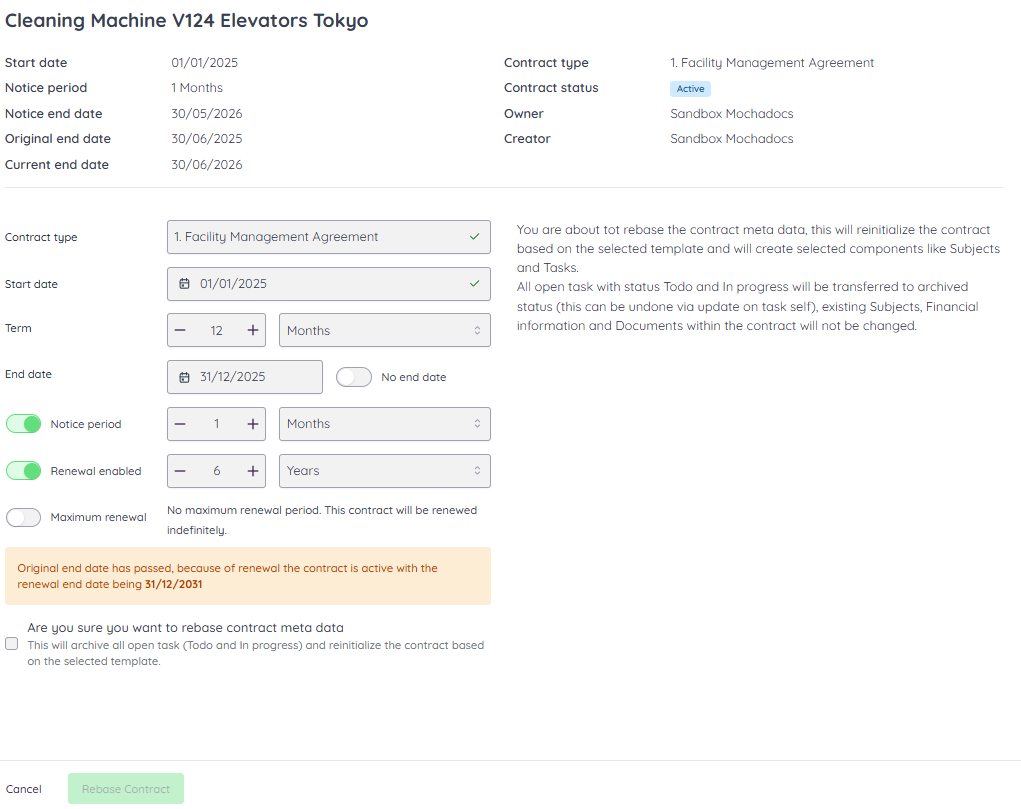
    The release introduces the Meta Data Changer, enabling users to reset metadata dates. This update improves data accuracy and gives better control over contract information management., In addition, task status patching has been separated from the regular patch process to ensure clearer system behavior and more reliable updates. The meaning of the task main status "archived" is now explicitly clarified within the interface, making it clear how archived tasks should be interpreted and handled. To prevent unintended changes, tasks with the main status "archived" can no longer be updated, ensuring data integrity and consistent task lifecycle management.
    Release Notes

    New Features 

    • New task status: Archived Task
    • Release of Meta Data changer
      •  Implement removal of contract terms and clearing dates of metadata  
      •  Patching of task status on task needs to be separated from regular patch 
      •  Clearly show what task main status ARCHIVED means for the task 
      •  Disable update task if task main status is ARCHIVED 


    Screenshot Meta Data Changer

    Screen changing Meta Data


    Release Notes....

    Release notes 1.10

    The release introduces the Meta Data Changer, enabling users to reset metadata dates. This update improves data accuracy and gives better control over contract information management.

    Release notes 1.9

    With Object Templates you can now link structured data directly to your contracts. This makes contract information consistent, reusable, and easier to manage across the contract lifecycle.

    Release notes 1.8

    This release improves visibility, usability, and technical stability across the platform. Contract parties are now visible on tasks, subjects, documents, and financial data, so you always have direct insight into who is involved.

    Release notes 1.7

    This release focuses on making date handling and data export more predictable and more useful for you. The datepicker now always uses the timezone of the workspace, so selected dates no longer shift because of user or system timezone differences.